How I accidentally made the fastest C# CSV parser
Over the 2025 Christmas break, I was on a bus trip interstate and had about 24 hours to kill. I was reading about UTF-8 and found something really interesting I never realized about the encoding set; all traditional ASCII characters are preserved as-is as their original single bytes, which means they can be scanned for super fast. Through this I played around with code that could count such characters as fast as possible, eventually ending up with a polished CSV parser that was competitive if not faster than existing parsers.
Let me explain the process I went through, experimenting and optimizing and eventually getting to this position.
Preamble: What character encodings are all about
To be able to understand why we’re able to process text so fast in the first place, we need to first understand how text is stored in computer memory.
(If you know how Unicode and UTF-8/16 work, you can probably skip this chapter. But you could also just stay for the fun facts)
Ever since the dawn of computers, storage and processing of textual data has been notoriously complicated. This is purely due to two things:
- The smallest meaningful unit of data on a computer is a byte, which can contain any number between 0 - 255
- Mankind uses more than 256 different characters for text, across all languages combined
So, computer engineers had two different questions to tackle: How do you represent more than 256 characters, and how do you do it efficiently?
If you’ve done any work with converting text characters back and forth between bytes, you’ve more than likely seen an ASCII table like this:
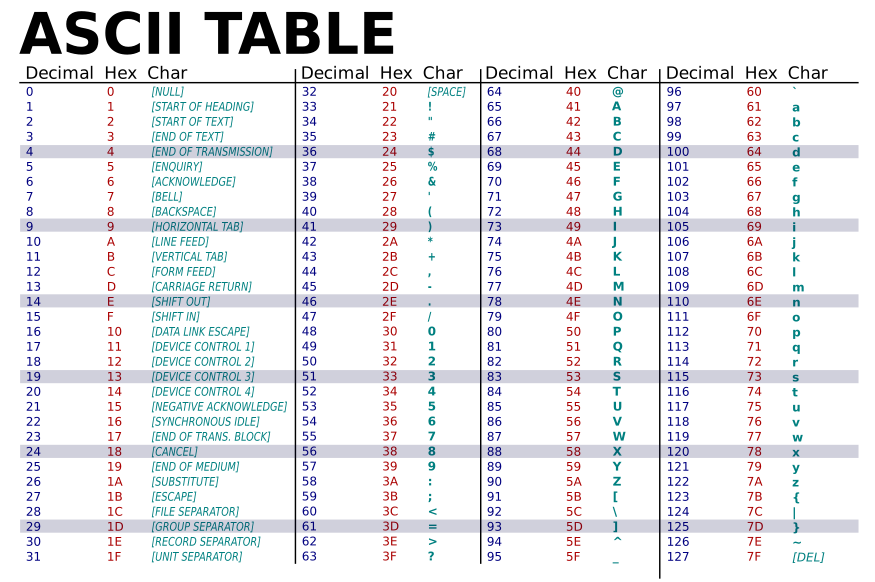
Believe it (or not), this is a character encoding. It defines a map of bytes to their human readable text characters. This was created in the 1970s and adopted / co-opted everywhere American computers were shipped (the A in ASCII stands for “American”, after all).
A major exception is in countries that have languages that use non-Latin characters. They would have their own characters sets (also known as “code pages” when in the context of an OS), each with a different mapping for each character. Most of them reserved the same area as ASCII for latin characters, and then the extended space beyond 0x7F for their own characters. Some needed even more space, so they would define some characters as multi-byte sequences.
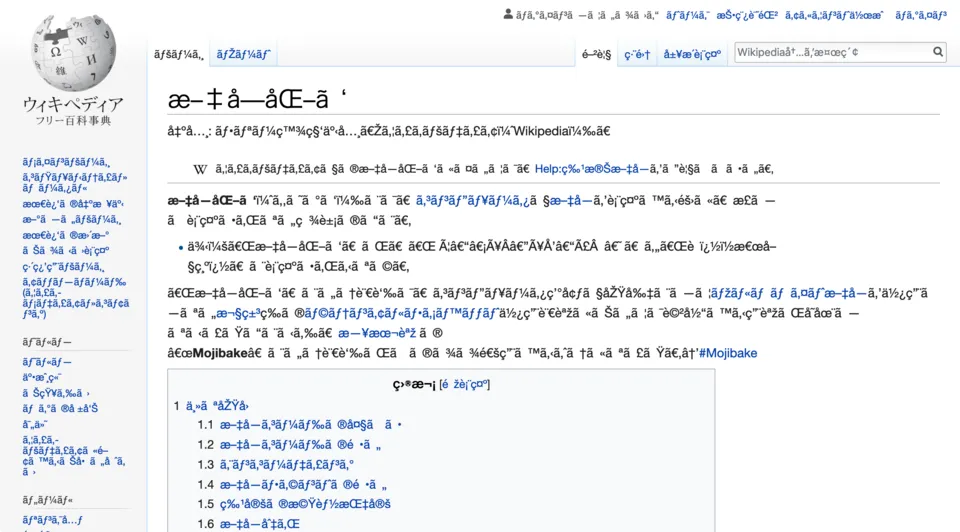
The worst part about this was that files typically did not (and to be completely honest, still don’t) store which encoding was used for the text data, so if you opened the file and assumed the wrong encoding, you would get gibberish:
Unicode: The one encoding to rule them all
At this point, computer engineers have had enough. There are hundreds of different, bespoke encodings. Can you imagine needing to handle all of them, let alone converting between them?
Enter Unicode, created in the 90s. The premise for it is very simple; every character is assigned a number (also known as a codepoint), and instead of trying to directly map characters to bytes, you map those assigned numbers to bytes instead.
In reality, it’s not as simple as that. Some characters are used much more than others, and a goal of Unicode was to be somewhat backwards compatible with existing character encodings that used ASCII as a base (which is why in ASCII characters map 1:1 in UTF-8, meaning they’re completely interchangable if you only stick to those characters)
And on top of that, there are actually multiple character encodings for the same Unicode character list, each defined as a “UTF”.
I could talk a lot more about the history and other irrelevant things, but I think we’re straying too far from the article. But I’ll grant myself one aside.
Unicode was eventually adopted basically everywhere, and it’s basically impossible to find a text file encoded in anything that isn’t based on it. Except for two notable locales:
- Japanese computer systems were much slower to adopt Unicode and instead used their own, Shift-JIS. The situation isn’t as bad as it once was, but even as recently as 2010 50% of websites were still only serving Shift-JIS and 38% were using Unicode.
- Chinese computer systems, where both the OS and applications running on it are actually mandated by law to support GB 18030, a Chinese character encoding somewhat loosely based off of Unicode, and is “the official character set of the People’s Republic of China”. It is very complicated to convert between Unicode and this, and even breaks compatibility with Unicode over which codepoints refer to which characters, even though it’s intended to be used as a fully supported alternative UTF encoding.
Can you believe that? A government mandated encoding set. See, this is what I mean by being able to talk a lot more about other interesting things. But I digress.
UTF-8, UTF-16 and UTF-32
Now we get into the real technical meat and bones of Unicode. Unicode is designed to have space for 1.1 million characters (which is hopefully enough for everyone). As a result, taking into account other structural parts of Unicode, codepoints can be considered 32 bit integers.
So does that mean you need to waste 4 bytes for every character? Of course not. This is why there are multiple different ways to convert Unicode codepoints to and from bytes. The general concept is variable-length encoding; the first byte for each character specifies in advance how many bytes follow it.
For example, here’s what the general structure for UTF-8 looks like when encoding a number, depending on how many bytes it requires:
| Bytes needed | Codepoint range | Binary structure |
| 1 byte | U+0000 to U+0080 | 0xxxxxxx |
| 2 bytes | U+0080 to U+07FF | 110xxxxx 10xxxxxx |
| 3 bytes | U+0800 to U+FFFF | 1110xxxx 10xxxxxx 10xxxxxx |
| 4 bytes | U+10000 to U+10FFFF | 11110xxx 10xxxxxx 10xxxxxx 10xxxxxx |
So from a processing point of view, it’s straightforward. You check the bits set in the first byte for how long the sequence will be, and read/write your actual codepoint value in the free space denoted by the “x”s. This is also self-synchronizing, so that if you get corrupted data, you don’t lose the rest of the data afterwards or have to guess where the next character starts; you just have to find the next valid starting bit sequence and go from there. Another really cool feature about UTF-8 is that bytes from 0x00 - 0x7F match up with their ASCII equivalent, so that it’s backwards compatible with all ASCII files.
UTF-16 does a similar thing, but instead of 1 byte being the width of a “code unit”, it’s two bytes (hence the “16”, as it means 16 bits). It still retains the ability to have another code unit chained on at the end, called “surrogates”, but it’s not as elegant as UTF-8’s system.
UTF-32 actually skips all of this, and just writes the codepoint as a whole 32 bit number. Very wasteful, but also very quick to translate and process. You can use whatever is the best fit for your needs (or whatever legacy workflow you need to support).
Here’s some examples of what that looks like in practice with some handpicked characters:
| Text character | Codepoint (hexadecimal) | UTF-8 representation | UTF-16 representation | UTF-32 representation |
| E | U+0045 | 0x45 | 0x00 0x45 | 0x00 0x00 0x00 0x45 |
| Ж | U+0416 | 0xD0 0x96 | 0x04 0x16 | 0x00 0x00 0x04 0x16 |
| ぁ | U+3041 | 0xE3 0x81 0x81 | 0x30 0x41 | 0x00 0x00 0x30 0x41 |
| 😎 | U+1F60E | 0xF0 0x9F 0x98 0x8E | 0xD8 0x3D 0xDE 0x0E | 0x00 0x01 0xF6 0x0E |
Taking all this into account, there are a few facts that we will be using going forward with the actual content of the article:
- Since all UTF formats are essentially different ways of encoding a list of codepoint numbers, the easiest way to convert between them is to extract each codepoint from the source sequence and rewrite it in the target format
- You can check if a character is multiple bytes long when reading by checking the first bit of the first byte; if it’s a 0 then it’s a single character, if it’s a 1 then it’s multiple
- Most importantly, any characters within the ASCII range will always be exactly one byte to maintain backwards compatibility with ASCII.
Counting characters as fast as possible
Okay, great. Finally got through all of that. The thing that started all this was me finding out that last point; if ASCII characters are one byte, then that means you can do a lot of really cool high performance tricks to parse a CSV file, since CSV control characters are all ASCII.
But first, let’s set a simpler goal and go from there. What’s the fastest way to count how many times a single character appears in a large UTF-8 text file?
As a baseline, we will be scanning for the character , in a 500MB CSV file.
const byte findByte = (byte)',';Software implementation: 135.305ms
static int CountSoftware(ReadOnlySpan<byte> data)
{
  int count = 0;

  for (int i = 0; i < data.Length; i++)
  {
    if (data[i] == findByte)
      count++;
  }

  return count;
}
This is the simplest possible implementation; simply iterate over every byte and check if it’s the same as the one we’re looking for. How much better can we do?
Software (unsafe): 128.683ms
static unsafe int CountSoftwareUnsafe(ReadOnlySpan<byte> data)
{
  int count = 0;
  int length = data.Length;

  fixed (byte* ptr = data)
    for (int i = 0; i < length; i++)
    {
      if (ptr[i] == findByte)
        count++;
    }

  return count;
}
Here’s the first optimization. Every time you access an array (e.g. via data[i] as we were in the previous function), the .NET runtime will perform something called “bounds checking” which is making sure that your index (i) is between 0 and the length of the array, so that it can throw a IndexOutOfRangeException if it’s outside.
When you use unsafe pointers to access the contents of the array instead, you’re making a promise to the runtime that you’re not going to access data outside of the array’s range. Because if you do, you could encounter an AccessViolationException, or even worse no exception at all and continue to process invalid data (hence the term “unsafe”).
In doing so, we shave off 7ms.
Software (unsafe, unrolled 4x): 105.320ms
static unsafe int CountSoftwareUnsafeUnrolled4x(ReadOnlySpan<byte> data)
{
  int count = 0;
  int length = data.Length;

  fixed (byte* ptr = data)
  {
    int i = 0;

    for (; i + 3 < length; i += 4)
    {
      if (ptr[i] == findByte)
        count++;
      if (ptr[i + 1] == findByte)
        count++;
      if (ptr[i + 2] == findByte)
        count++;
      if (ptr[i + 3] == findByte)
        count++;
    }

    for (; i < length; i++)
    {
      if (ptr[i] == findByte)
        count++;
    }
  }

  return count;
}
The machinery inside of a for loop can be deceptively expensive. In the previous functions, every time you compared a byte you had to check if you were at the end of the array, and perform an expensive jump back to the start of the loop if not. This overhead is large as a result, so the next optimization is to reduce it by trying to do comparisons in chunks of 4. This could be tweaked further to find a sweet spot, but it’ll depend a lot on the target system.
Note that we still have the slower single byte comparison at a time loop at the end of the function. This is purely because not all data you process is going to be a multiple of 4, so you need to be able to process any stragglers at the end.
SIMD: Single Instruction, Multiple Data
Before we go further into the next set of optimizations, I need to explain another concept first.
So far, we have been processing one byte at a time. For example, let’s look at what it looks like adding two bytes at a time, from array1 and array2 into array3:
| 0 | 1 | 2 | 3 | 4 | 5 | 6 | 7 | ||
| array1 | 4 | 8 | 43 | 29 | 12 | 61 | 50 | 58 | |
| array2 | + | 48 | 22 | 54 | 22 | 43 | 36 | 1 | 56 |
| array3 | = | 54 | .. | .. | .. | .. | .. | .. | .. |
To sum all of the elements of the arrays, you have to iterate over each element individually and end up doing 8 distinct addition instructions. You could speed this up using multiple threads, where each thread is allocated its own slice and process them in parallel:
| 0 | 1 | 2 | 3 | 4 | 5 | 6 | 7 | ||
| array1 | 4 | 8 | 43 | 29 | 12 | 61 | 50 | 58 | |
| array2 | + | 48 | 22 | 54 | 22 | 43 | 36 | 1 | 56 |
| array3 | = | 54 | .. | 97 | .. | 55 | .. | 51 | .. |
In this example, each thread is assigned a slice of two elements each to process. While in theory this would be 4x as fast, in reality managing multiple threads is messy and has lots of overhead. On top of that, it’s not any more efficient since it’s doing the same amount of work, just spread out over different CPU cores. What can we do that’s better?
Enter SIMD instructions. At their core, the premise is to perform a single operation over multiple different units of data at the same time. The killer part is that this is all done in hardware, so you get the result back in the same time it takes for a regular non-SIMD instruction to operate over a single unit of data.
An easier way to imagine this is doing long addition. Adding two single digit numbers like 8 + 2 is easy, and you can do it instantly. But if you wanted to add two large numbers, like 4672345 + 3782147 together, you’d have to work through each digit individually and eventually arrive at the total sum. Instead, imagine being able to look at those two numbers and immediately figuring out the sum with the same mental complexity as adding those two single digit numbers. That’s the power of SIMD.
So back to our example, if we used a SIMD instruction that performed a sum over 4 elements at a time, a single calculation would look like this:
| 0 | 1 | 2 | 3 | 4 | 5 | 6 | 7 | ||
| array1 | 4 | 8 | 43 | 29 | 12 | 61 | 50 | 58 | |
| array2 | + | 48 | 22 | 54 | 22 | 43 | 36 | 1 | 56 |
| array3 | = | 54 | 30 | 97 | 51 | .. | .. | .. | .. |
We do 4x the work for the same amount of effort. Personally, I think this is one of the coolest features of modern CPUs.
SSE2 SIMD: 46.663ms
static int CountSSE2(ReadOnlySpan<byte> data)
{
  var compareVector = Vector128.Create(findByte);

  int count = 0;
  int i = 0;

  for (i = 0; i + 15 < data.Length; i += 16)
  {
    var dataVector = Vector128.Create(data.Slice(i, 16));
    var equal = Sse2.CompareEqual(compareVector, dataVector);
    var mask = (uint)Sse2.MoveMask(equal);
    while (mask != 0)
    {
      count += (int)(mask & 0x1);
      mask >>= 1;
    }
  }

  for (; i < data.Length; i++)
  {
    if (data[i] == findByte)
      count++;
  }

  return count;
}
Here’s the first implementation of a function using SIMD. SSE2, first introduced in x86 processors in 2000 and is basically in everything made since then, has a width of 128 bits / 16 bytes, which is why the main loop now iterates over chunks of 16 bytes.
SIMD instructions require data to be placed in special CPU registers and can’t operate directly over arrays, so we control data in the registers with the Vector128 structure. Here’s what the workflow looks like for the string “Hello, I, like, commas.” (clipped over the first 9 bytes so it’ll fit in the article):
| 0 | 1 | 2 | 3 | 4 | 5 | 6 | 7 | 8 | 9 | 10 | 11 | 12 | 13 | 14 | 15 | 16 | 17 | 18 | 19 | 20 | 21 | 22 | ||
| dataVector | H | e | l | l | o | , | I | , | l | i | k | e | , | c | o | m | m | a | s | . | ||||
| compareVector | , | , | , | , | , | , | , | , | , | , | , | , | , | , | , | , | ||||||||
| equalVector | Sse2.CompareEqual | 0 | 0 | 0 | 0 | 0 | 255 | 0 | 0 | 255 | 0 | 0 | 0 | 0 | 0 | 255 | 0 | |||||||
| mask | Sse2.MoveMask | 0 | 0 | 0 | 0 | 0 | 1 | 0 | 0 | 1 | 0 | 0 | 0 | 0 | 0 | 1 | 0 |
Sse2.CompareEqual outputs 255 in each slot where the two bytes match, and Sse2.MoveMask extracts the most significant bit in each slot, condensing it down to a 16-bit integer. So we end up with a mask where each set bit corresponds with the location of a match, which we can then process. Elegant.
But can we go further?
AVX2 SIMD: 42.220ms
static int CountAvx2(ReadOnlySpan<byte> data)
{
  var compareVector = Vector256.Create(findByte);

  int count = 0;
  int i = 0;

  for (i = 0; i + 31 < data.Length; i += 32)
  {
    var dataVector = Vector256.Create(data.Slice(i, 32));

    var equal = Avx2.CompareEqual(compareVector, dataVector);
    var mask = (uint)Avx2.MoveMask(equal);

    while (mask != 0)
    {
      count += (int)(mask & 0x1);
      mask >>= 1;
    }
  }

  for (; i < data.Length; i++)
  {
    if (data[i] == findByte)
      count++;
  }

  return count;
}
Instead of SSE2, let’s use AVX2 instead. Introduced to x86 CPUs in 2011, it has a width of 32 bytes instead of only a meager 16 bytes.
It provides a marginal speed increase instead of the massive one we previously saw, so the next bottleneck seems to be somewhere else. In this case, it’s the loop that converts the mask into a countable number. Let’s see what we can do about that.
AVX2 + TZCNT: 16.630ms
static int CountAvx2Tzcnt(ReadOnlySpan<byte> data)
{
  var compareVector = Vector256.Create(findByte);

  int count = 0;
  int i = 0;

  for (i = 0; i + 31 < data.Length; i += 32)
  {
    var dataVector = Vector256.Create(data.Slice(i, 32));

    var equal = Avx2.CompareEqual(compareVector, dataVector);
    var mask = (uint)Avx2.MoveMask(equal);

    while (mask != 0)
    {
      count++;

      int bIndex = BitOperations.TrailingZeroCount(mask);
      mask ^= 1u << bIndex;
    }
  }

  for (; i < data.Length; i++)
  {
    if (data[i] == findByte)
      count++;
  }

  return count;
}
So now instead of repeatedly shifting the mask down and checking the least significant bit, we can use TrailingZeroCount to directly find the next set bit and flip it directly, so we don’t have to waste any effort on unset bits in the mask.
If it was implemented in software, TrailingZeroCount would be too slow to provide any benefit. But in this case it’s another operation that’s implemented in your CPU hardware, where instead of needing to iterate over each individual bit, it’ll do it all instantly.
There’s one better fitting operation here, though:
AVX2 + POPCNT: 13.673ms
static int CountAvx2Tzcnt(ReadOnlySpan<byte> data)
{
  var compareVector = Vector256.Create(findByte);

  int count = 0;
  int i = 0;

  for (i = 0; i + 31 < data.Length; i += 32)
  {
    var dataVector = Vector256.Create(data.Slice(i, 32));

    var equal = Avx2.CompareEqual(compareVector, dataVector);
    var mask = (uint)Avx2.MoveMask(equal);

    count += BitOperations.PopCount(mask);
  }

  for (; i < data.Length; i++)
  {
    if (data[i] == findByte)
      count++;
  }

  return count;
}
PopCount is pretty much designed exactly for this scenario. Taking in a mask, it will output the amount of bits that are set to 1 in the input integer. It’s also implemented in hardware, so it’s super fast.
We have basically hit the wall in performance here. While there is more we could do, it’s going to be scraping the bottom of the barrel and only give us sub-millisecond improvements. But to be honest, a 10x speed increase on its own is extremely good.
Using this to create a CSV parser
When parsing a CSV file, there are three characters that we care about to calculate the structure of the file and the positions of the values: , (comma), " (quotation mark), and \n (new line).
This is where the previous experiment comes into play. The key to having a high performance CSV parser is identifying these structural characters as fast as possible, and then applying some rules:
- When a comma is encountered, it marks the end of a field
- When a new line is encountered, it marks the end of a row
- When a quotation mark is encountered, it escapes all structural characters until another quotation mark is encountered.
- If there are two quotation marks in a row, it should only result in one quotation mark in the output result
To keep parsing super fast & lean, and do only what is absolutely necessary, we’ll split up the parsing into two parts. One function will handle determining the locations and lengths of each value in a row, and another to actually do the value extraction and escaping.
Here’s what they look like, simplified a lot (with edge cases and micro-optimizations removed) so it’s easier to follow:
private readonly Vector256<byte> separatorVector = Vector256.Create((byte)',');
private readonly Vector256<byte> escapeVector = Vector256.Create((byte)'\"');
private readonly Vector256<byte> newlineVector = Vector256.Create((byte)'\n');

private readonly (int offset, int length, bool isEscaped)[] fieldInfo = new[256];

protected override int DetermineFields(ReadOnlySpan<byte> buffer)
{
  int endChar = -1;
  int fieldStart = 0;
  bool wasOnceEscaped = false;
  bool isEscaped = false;
  fieldCount = 0;

  int i = 0;

  for (; i + 31 < buffer.Length; i += 32)
  {
    // load next block of data to scan against
    Vector256<byte> dataVector = Vector256.Create(buffer.Slice(i));

    uint separatorMask = (uint)Avx2.MoveMask(Avx2.CompareEqual(dataVector, separatorVector));
    uint escapeMask = (uint)Avx2.MoveMask(Avx2.CompareEqual(dataVector, escapeVector));
    uint newlineMask = (uint)Avx2.MoveMask(Avx2.CompareEqual(dataVector, newlineVector));

    // combine the masks into one that we will use for determining structural characters
    var combinedMask = separatorMask | escapeMask | newlineMask;

    while (combinedMask != 0)
    {
      int index = BitOperations.TrailingZeroCount(combinedMask);
      uint bit = (1u << index);

      if ((escapeMask & bit) != 0) // quotation mark
      {
        isEscaped = !isEscaped;
        wasOnceEscaped = true;

        goto continueLoop;
      }

      if (isEscaped)
      {
        // if we encountered one quotation mark and haven't encountered the next yet, skip the remaining structural characters
        goto continueLoop;
      }

      if ((separatorMask & bit) != 0) // comma
      {
        // record the position data of the current field
        fieldInfo[fieldCount++] = (fieldStart, i + index - fieldStart, wasOnceEscaped);

        fieldStart = i + index + 1;
        wasOnceEscaped = false;
      }
      else if ((newlineMask & bit) != 0) // new line
      {
        // stop parsing new fields
        endChar = i + index;
        goto exit;
      }

      continueLoop:
      combinedMask &= ~bit; // clear this bit
    }
  }

  // (Non-SIMD loop variant removed for brevity)

  exit:

  fieldInfo[fieldCount++] = (fieldStart, endChar - fieldStart, wasOnceEscaped);

  return endChar;
}
So a few notes:
- We use the slightly slower
BitOperations.TrailingZeroCountinstead ofBitOperations.PopCountbecause we care about positional data, and PopCount doesn’t preserve it. - The same
Avx2.CompareEqual+Avx2.MoveMaskworkflow is used multiple times for each character we want to scan for, and then merged into one combined mask to iterate against. We keep the separate masks since we need to later re-identify which structural character it is that we have found - We don’t touch the values of the fields at all. If the user only cares about one column, we should only actually process the content when the user requests it
The other piece of the puzzle is handling escaped fields. We have to process and remove extra quotation marks from any fields that have them. What’s the best way to go about doing that?
private int UnescapeField(Span<char> destination, (int offset, int length, bool isEscaped) info)
{
  if (!info.isEscaped)
  {
    // no quotes, so we can use the faster in-built UTF-8 -> UTF-16 conversion
    return Encoding.UTF8.GetChars(new Span<byte>(bufferPtr + info.offset, info.length), destination);
  }

  // we found quotes, so we have to do our own bespoke UTF-16 conversion while handling quotes

  int idx = 0;
  int rawLength = info.offset + info.length;

  for (int i = info.offset; i < rawLength; i++)
  {
    byte c = bufferPtr[i];
    if (c == (byte)'"')
    {
      if (i != info.offset && i + 1 < rawLength)
      {
        var nextC = bufferPtr[i + 1];
        if ((nextC & 0x80) == 0)
        {
          // as long as the next character isn't the start of a multi-byte sequence, copy it directly to the destination
          // we need to do this to preserve one quotation mark out of any paired quotation marks
          destination[idx++] = (char)nextC;
          i++;
        }
      }
    }
    else if ((c & 0x80) != 0) // multi-byte sequence
    {
      var encodedLength = BitOperations.LeadingZeroCount((uint)(~c & 0xFF)) - 24;
      uint codePoint;

      if (encodedLength == 2) // 2 bytes long - always 1 utf16 char
      {
        codePoint = (uint)((c & 0b0001_1111) << 6 | (bufferPtr[i + 1] & 0b0011_1111));

        destination[idx++] = (char)codePoint;
        i += 1;
      }
      else if (encodedLength == 3) // 3 bytes long - always 1 utf16 char
      {
        codePoint = (uint)((c & 0b0000_1111) << 12 |
                    (bufferPtr[i + 1] & 0b0011_1111) << 6 |
                    (bufferPtr[i + 2] & 0b0011_1111));

        destination[idx++] = (char)codePoint;
        i += 2;
      }
      else // 4 bytes long - always 2 utf16 chars as a surrogate pair. convert UTF8 -> UTF32 -> UTF16
      {
        codePoint = (uint)((c & 0b0000_0111) << 18 |
                    (bufferPtr[i + 1] & 0b0011_1111) << 12 |
                    (bufferPtr[i + 2] & 0b0011_1111) << 6 |
                    (bufferPtr[i + 3] & 0b0011_1111));

        codePoint -= 0x10000;
        destination[idx++] = (char)(ushort)((codePoint >> 10) + 0xD800);  // high surrogate
        destination[idx++] = (char)(ushort)((codePoint & 0x3FF) + 0xDC00); // low surrogate

        i += 3;
      }
    }
    else // ASCII single-byte sequence
    {
      destination[idx++] = (char)c;
    }
  }

  return idx;
}
Good thing we did that Unicode primer up above. A very, very important thing to know about strings in C# is that they are UTF-16 internally. Every char is actually a single 16-bit UTF-16 code unit, so you can’t just directly copy UTF-8 bytes and expect them to work.
If the field isn’t escaped by quotation marks at all, then we can pass off the implementation to Encoding.UTF8.GetChars. It uses a lot of black magic and runtime internals I don’t understand or have access to, and is consistently faster than anything we could build. But in the case where we have quotation marks, it’s faster to just do it clunkily ourselves instead of using Encoding.UTF8.GetChars to a temporary buffer and then doing a second processing scan to remove the quotation marks.
The only complex part of this function is the conversion from UTF-8 to UTF-16. ASCII characters just need to be widened to 16 bits (by casting to char), but multi-byte sequences need to have their codepoint extracted prior to conversion. Another cool fact we can abuse here is that any 2 or 3 byte UTF-8 sequences will always result in a single UTF-16 code unit, so the representation is the code point itself clipped to the lowest 16 bits.
The UTF-16 problem
Okay, so this is pretty much the basis for a decent UTF-8 CSV parser. And since basically all text files created today are in UTF-8, that should account for everything, right…?
Well, not exactly. As I said above, C# internally uses UTF-16 for everything char and string related. So our parser can’t even read strings created in C#!
We should fix that. Most of the code is the same, but requires some alteration to scan for two byte characters (since we don’t have ASCII compatibility anymore). Originally I thought this was impossible to do in any similarly well performing way, but after spending some time on it I figured out something close.
The main change is within the scan loop:
// ...

Vector256<short> dataVector1 = Avx.LoadVector256((short*)bufferPtr + i);
Vector256<short> dataVector2 = Avx.LoadVector256((short*)bufferPtr + i + 16);

// values 256 -> 32767 will be cast correctly and saturated to 255.
// 32768 -> 65535 will be interpreted as negative and saturate to 0. perfect for us, since ASCII remains untouched
Vector256<byte> packedData = Avx2.PackUnsignedSaturate(dataVector1, dataVector2);

Vector256<byte> dataVector = Avx2.Permute4x64(packedData.AsUInt64(), 0b11_01_10_00).AsByte();

uint separatorMask = (uint)Avx2.MoveMask(Avx2.CompareEqual(dataVector, separatorVector));
uint escapeMask = (uint)Avx2.MoveMask(Avx2.CompareEqual(dataVector, escapeVector));
uint newlineMask = (uint)Avx2.MoveMask(Avx2.CompareEqual(dataVector, newlineVector));

uint combinedMask = separatorMask | escapeMask | newlineMask;

// ...
Originally this was just a copy of the UTF-8 version where you were comparing 2 bytes at a time, meaning you only had half the throughput and was quite slower. But this is a bit more clever.
Avx2.PackUnsignedSaturate takes in two AVX2 vectors, interprets the inputs as 16-bit integers, and then folds them down to a single 8-bit integer sequence, just like the UTF-8 loop. It saturates them in the process, meaning that values above 255 get turned into 255 and values below 0 get turned into 0. Since the characters we’re interested in are within the 0-128 ASCII range, they stay preserved which is fantastic.
It’s not completely perfect for our needs however since it also has two things that work against us:
- It only supports signed integer vectors as inputs, while we only have unsigned code units
- It interleaves the outputs in blocks of 8 bytes
Both of these can be solved. The first one can be completely ignored; even though we’re casting unsigned numbers to signed and getting negative numbers when we shouldn’t be, due to how the saturation works they will get flattened to 0 instead of 255. The second can be solved with Avx2.Permute4x64, which can be use to shift around blocks of 8 bytes to how we want it. And then from there, we can use the mask the same way as we were before.
Here’s an extended diagram against the string cat,猫,mačka,мачка,mačka,chatte,katė, to visually see what’s going on (but you’ll need to scroll to see everything).
| 0 | 1 | 2 | 3 | 4 | 5 | 6 | 7 | 8 | 9 | 10 | 11 | 12 | 13 | 14 | 15 | 16 | 17 | 18 | 19 | 20 | 21 | 22 | 23 | 24 | 25 | 26 | 27 | 28 | 29 | 30 | 31 | 32 | 33 | 34 | 35 | 36 | 37 | 38 | 39 | 40 | 41 | 42 | 43 | 44 | 45 | 46 | 47 | 48 | 49 | 50 | 51 | 52 | 53 | 54 | 55 | 56 | 57 | 58 | 59 | 60 | 61 | 62 | 63 | 64 | 65 | 66 | 67 | 68 | 69 | ||
| dataVector1 dataVector2 | c (99) | a (97) | t (116) | , (44) | 猫 (29483) | , (44) | m (109) | a (97) | č (269) | k (107) | a (97) | , (44) | м (1084) | а (1072) | ч (1095) | к (1082) | а (1072) | , (44) | m (109) | a (97) | č (269) | k (107) | a (97) | , (44) | c (99) | h (104) | a (97) | t (116) | t (116) | e (101) | , (44) | k (107) | a (97) | t (116) | ė (279) | ||||||||||||||||||||||||||||||||||||
| packedData | Avx2.PackUnsignedSaturate | c (99) | a (97) | t (116) | , (44) | ÿ (255) | , (44) | m (109) | a (97) | ÿ (255) | , (44) | m (109) | a (97) | ÿ (255) | k (107) | a (97) | , (44) | ÿ (255) | k (107) | a (97) | , (44) | ÿ (255) | ÿ (255) | ÿ (255) | ÿ (255) | c (99) | h (104) | a (97) | t (116) | t (116) | e (101) | , (44) | k (107) | ||||||||||||||||||||||||||||||||||||||
| dataVector | Avx2.Permute4x64 | c (99) | a (97) | t (116) | , (44) | ÿ (255) | , (44) | m (109) | a (97) | ÿ (255) | k (107) | a (97) | , (44) | ÿ (255) | ÿ (255) | ÿ (255) | ÿ (255) | ÿ (255) | , (44) | m (109) | a (97) | ÿ (255) | k (107) | a (97) | , (44) | c (99) | h (104) | a (97) | t (116) | t (116) | e (101) | , (44) | k (107) | ||||||||||||||||||||||||||||||||||||||
| separatorVector | , | , | , | , | , | , | , | , | , | , | , | , | , | , | , | , | , | , | , | , | , | , | , | , | , | , | , | , | , | , | , | , | |||||||||||||||||||||||||||||||||||||||
| Avx2.CompareEqual | 0 | 0 | 0 | 255 | 0 | 255 | 0 | 0 | 0 | 0 | 0 | 255 | 0 | 0 | 0 | 0 | 0 | 255 | 0 | 0 | 0 | 0 | 0 | 255 | 0 | 0 | 0 | 0 | 0 | 0 | 255 | 0 | |||||||||||||||||||||||||||||||||||||||
| separatorMask | Avx2.MoveMask | 0 | 0 | 0 | 1 | 0 | 1 | 0 | 0 | 0 | 0 | 0 | 1 | 0 | 0 | 0 | 0 | 0 | 1 | 0 | 0 | 0 | 0 | 0 | 1 | 0 | 0 | 0 | 0 | 0 | 0 | 1 | 0 | ||||||||||||||||||||||||||||||||||||||
On the flipside, since we’re already dealing with UTF-16 the code to unescape is super simple:
private int UnescapeField(Span<char> destination, (int offset, int length, byte escapedCount) info)
{
  int rawLength = info.offset + info.length;
  int idx = 0;

  for (int i = info.offset; i < rawLength; i++)
  {
    char c = bufferPtr[i];
    if (c == '"')
    {
      if (i != info.offset && i + 1 < rawLength)
      {
        destination[idx++] = bufferPtr[i + 1];
        i++;
      }
    }
    else
      destination[idx++] = c;
  }

  return idx;
}
Creating a comprehensive benchmark
So now after spending a few days polishing and making it useable, we have a proper CSV parser. How do we compare it against other high performance libraries?
There do exist some benchmarks for CSV parsing in C#:
- https://github.com/MarkPflug/Benchmarks/blob/main/docs/CsvReaderBenchmarks.md
- https://www.joelverhagen.com/blog/2020/12/fastest-net-csv-parsers
- https://nietras.com/2023/06/05/introducing-sep/#reader-comparison-benchmarks
But personally I think they’re all not very good, purely for the fact that they all only perform the test on a single CSV file. So they’re not necessarily benchmarking parsing CSV; rather measuring how well they perform against one specific scenario.
So instead let’s create our own benchmark suite. What kind of data do we want to test against?
- A dataset that is wide, has many different types of data, and a lot of human text. I’d consider this an “ideal” dataset, since it’s the most balanced in every aspect and could easily be seen as a real world scenario. For this, I grabbed a large snippet out of
RC_2008-01.ndjsonfrom the Reddit ArcticShift dumps and converted it into CSV format. - Data that contains a lot of non-Latin Unicode characters, to represent handling international and non-English text. I chose item_flavor_text.csv from the Veekun pokedex dataset, which contains names and descriptions for every item in every Pokemon game.
- Financial data, with a lot of numbers and very light on text. I picked data provided by exelbianalytics since it fills this role, and because it’s also used by the MarkPflug/Benchmarks benchmark.
We should also create some synthetic data to test specific, more stable scenarios:
- A file with four columns, with numbers between 0-2000 in each field as a baseline.
- Same as above, but really short at 50 rows long so we can test the overall overhead of each library.
- Another similar file, but with the numbers wrapped in quotation marks so we can see if there’s any change in performance when every field is quoted.
- And finally, a really, really difficult CSV file to parse, with an excessive amount of quotation marks and other structural characters that would make any parser fall to their knees.
I ended up assembling it all and ran the tests a few times, and published the results here: https://bepis.io/csv-benchmark/
And for the TLDR: My library is the fastest in 41 out of the 70 tests. Not a complete sweep, but far enough over the line where I’d say it stands on top.
Why this ends up being faster than Sep for most benchmarks
So if you’re not aware, up until now Sep was considered the fastest CSV parser in C#. Why do we beat it in so many scenarios?
While I was polishing it I had a few ideas, but the more I tested and experimented the less I actually knew. So I only have a handful of theories:
UTF-8
Simply put, it’s much faster to process UTF-8 data than UTF-16, so some benchmarks skew over to my library as a result. Sep doesn’t have code for operating on UTF-8 data; internally it converts it to UTF-16 first, meaning that it has to waste time and energy doing those conversions even if the user doesn’t want to use the data in the end.
Cache pressure
CPUs have their own memory built into their chips, called L1/L2/L3 caches. When you’re processing data this fast, having the memory physically closer to the CPU actually makes a difference so ideally you want to keep as much data as you can in these caches.
However these caches are extremely small, with the L1 cache being around 32-64KB per CPU core. The other thing is that this memory isn’t just for data, it’s also for executable code. So if you have a hot loop large enough, it can put a lot of pressure on this cache, or even cause it to overflow.
My library is around 16KB in size, while Sep is almost 10x that at 163KB. That can easily cause less space to be available for CSV data to be pipelined into the L1 cache, and cause a lot more accesses outside the cache.
Overfitting
When working on this library I didn’t want to look at the implementations of other libraries since it would’ve taken away the fun in doing this kind of optimization myself. However for this section I did take a look at Sep, and I can show you one area I think it suffers in.
The file that is closest to our processing loop is this one. It’s much more verbose and particular about how it wants data to be shifted around on the CPU and in memory. While in theory it’s faster because you’re micro-optimizing every aspect, it can bite you in the ass in two ways:
- You can very easily work yourself into a local minimum, where another path is faster but you can’t see it because the hill is too great to get there while micro-benchmarking
- You cut off any form of optimization that the runtime can do for you
Our compilers and machines aren’t dumb building blocks that only convert code and blindly execute instructions like they were maybe 20+ years ago. If they know they can make your code faster without it causing issues, they’ll do it. Especially if it’ll make the CPUs look faster than they actually are. Hell, the entire Spectre and Meltdown fiasco was caused because of CPUs trying to optimize branches while not being sanitary with the result data.
And this is also true on the software side; every time a new .NET version is released, I love going through the runtime change notes and seeing what new optimizations have been introduced. These optimizations happen under the hood so you get to benefit without actually doing anything, but only in the case where it can infer what you want to do and don’t particularly care about how it gets done.
So you have to balance between telling the compiler what you want to do vs. telling the compiler how you want it done. While it’s tempting to plan out and specify absolutely everything in your code you want to optimize, if there’s a platform or situation where it’s done better another way, or even with a later revision of the runtime that can make a certain pattern faster, its hands are tied because you’re forcing it to act a certain way.
Hardware
This could entirely be because it’s faster on my machine and not necessarily on others. System specs and memory latency can very easily throw off these kinds of hyper-focused benchmarks.
I can give you an example; originally my code used Sse.Prefetch0 to signal to the CPU that I was about to scan through a block of data, and to have that data ready in the L1 cache in advance before I got to it. On my DDR3 laptop with a lot of memory latency, this actually improved speeds by 10-20%. On my much quicker DDR5 desktop PC however, it made basically no difference.
That being said, there are many platforms where Sep will be faster than my library no matter what, especially on AVX-512 and ARM systems where it has hardware optimization there. I can’t really implement that myself since I don’t have access to those machines to test on.
Epilogue
If you want to use the library yourself or see the code for yourself, you can see it here:
https://github.com/bbepis/FourLambda.Csv
Thank you for reading my writeup! Please let me know what you think about it. I plan on releasing more libraries like this; there’s one I’m still working on for JSON parsing, and one I’m polishing up for Reed-Solomon data correction.
I also want to write more articles about other high performance tools I’ve created, such as an application for MySQL data importing that works 16x as fast as the next tool.
Thanks!
- Bepis